Amazon "bought in past month": what it means and how to estimate sales
Updated November 23, 2026
The “N+ bought in past month” line on Amazon shows how many times a product was bought over the last 30 days, rounded down to a round number: 50+, 100+, 1K+, 7K+ and so on. It is the only sales figure Amazon shows publicly, and it is a lower bound: “7K+” means at least 7,000. Multiply it by the price to get rough monthly revenue, then compare several competitors to judge the niche. Below is how to read the number, where it misleads, and how to check it in one click.
Where to find it
The line appears under the rating on the product page and on product cards in search results.
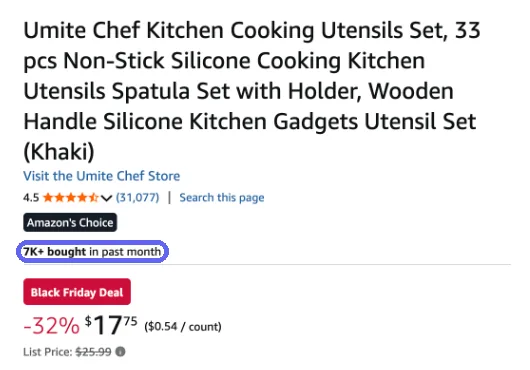
Listings with few sales do not show the line at all. If you do not see it, that alone tells you the product sells slowly or is new.
How to read the number
- It is rounded down. “7K+” means somewhere from 7,000 to just under the next step. “1K+” can be 1,000 or 1,900. Treat it as a minimum.
- It is recent. Unlike a lifetime “sold” counter on AliExpress, it covers about the last month, so an old listing with stopped sales does not look strong.
- It is per listing. Amazon does not publish exactly how variants are counted. Compare listings of a similar structure rather than a single-color item with a 20-color one.
- It moves with seasons and deals. A Black Friday deal or a seasonal peak can double the number for a month. Look at it again a few weeks later before you order.
From “bought” to revenue
A quick estimate: monthly sales x price = monthly revenue of the listing.
Example from the screenshot: 7,000 x $17.75 = about $124,000 a month for one seller. That is a lot of demand, and it also tells you how strong the incumbent is.
Then look at competition:
- Search for the product and open the first 5-10 organic results.
- Write down “bought in past month”, price, rating and number of reviews for each.
- If several sellers have solid numbers, the market is real. If one listing takes almost everything, you would be fighting a leader.
- A high review count (tens of thousands) with strong sales means a mature niche: you need a better product or a clear angle, not just a lower price.
A second public signal is the Best Sellers Rank in the product details section. It shows the position in the category, but not units, so use it to compare products within the same category.
The same check in one click
Amazon Helper reads “bought in past month”, price, rating and review count from the page and turns them into an opportunity score from 0 to 100 with a short AI verdict.
- Install it from the Chrome Web Store. It works in Chrome, Edge, Opera, Brave and Yandex Browser.
- Open an Amazon product page and click the round panel button in the bottom right corner.
- Click Demand in Step 1.
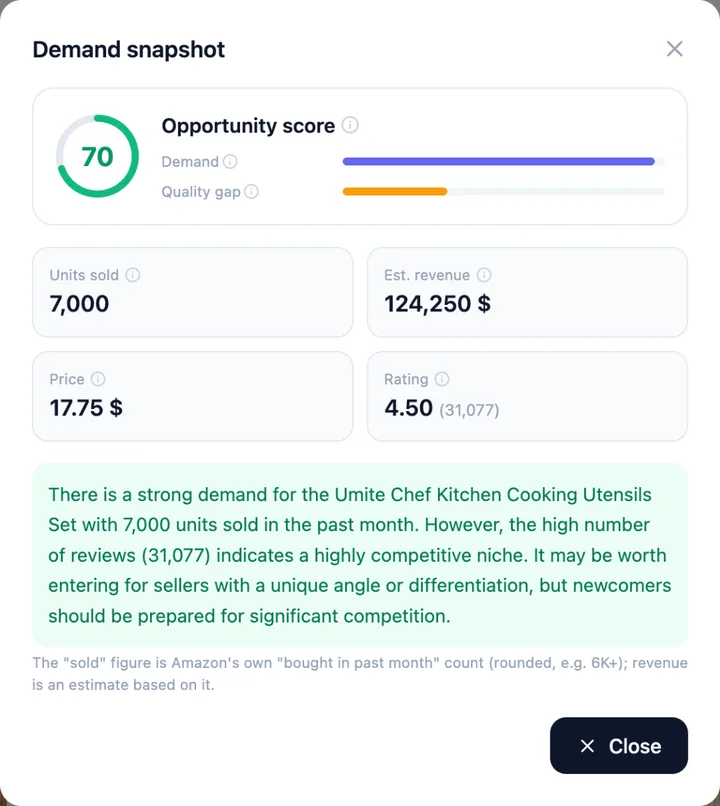
The Demand bar shows how much the product sells. The Quality gap bar shows room to win with a better product: it grows when the product sells well but its rating is mediocre. Here demand is near the top and the gap is small, so the verdict warns about strong competition.
The demand check is free 5 times a day, PRO ($4.99 per month) makes it unlimited. Run it on all 5-10 competitors and compare the scores side by side.
Checklist
- The line is visible on several competing listings, not only one.
- You took the number as a minimum and checked it outside a deal or seasonal peak.
- Monthly revenue of the leaders is worth the effort for your budget.
- You know what you would do better: price, quality, bundle or listing.
- Your landed cost leaves margin at the price competitors sell for.
FAQ
Is "bought in past month" the number of units or orders?
Amazon describes it as purchases over the past month and does not publish the exact method. For planning, treat it as an approximate count of units sold, rounded down.
Why do some products have no "bought in past month" line?
The product sells too few units to reach the first step, it is new, or Amazon does not show the line in that category or marketplace.
Is the number the same on amazon.com and amazon.de?
No. Each marketplace shows its own sales. Check the store where you plan to sell.
Does Amazon Helper use any data besides the page?
No. It reads what the page shows (title, price, rating, review count and "bought in past month") and sends it to the AI for a short verdict. It does not use paid sales databases.
Can I check Amazon review complaints with the extension?
No. Amazon shows only a few hand-picked reviews on the page, so a summary would be misleading. Read the 1-3 star reviews by hand on the full review page.